Category: Video Models

Open-source video generation models: Wan2.2, Sulphur, CogVideoX, and hands-on GPU testing

  • The Open-Source Video Generation Stack: Running Wan2.2, CogVideoX, and Mochi on Consumer Hardware

    The Open-Source Video Generation Stack: Running Wan2.2, CogVideoX, and Mochi on Consumer Hardware

    The Open-Source Video Generation Stack: Running Wan2.2, CogVideoX, and Mochi on Consumer Hardware

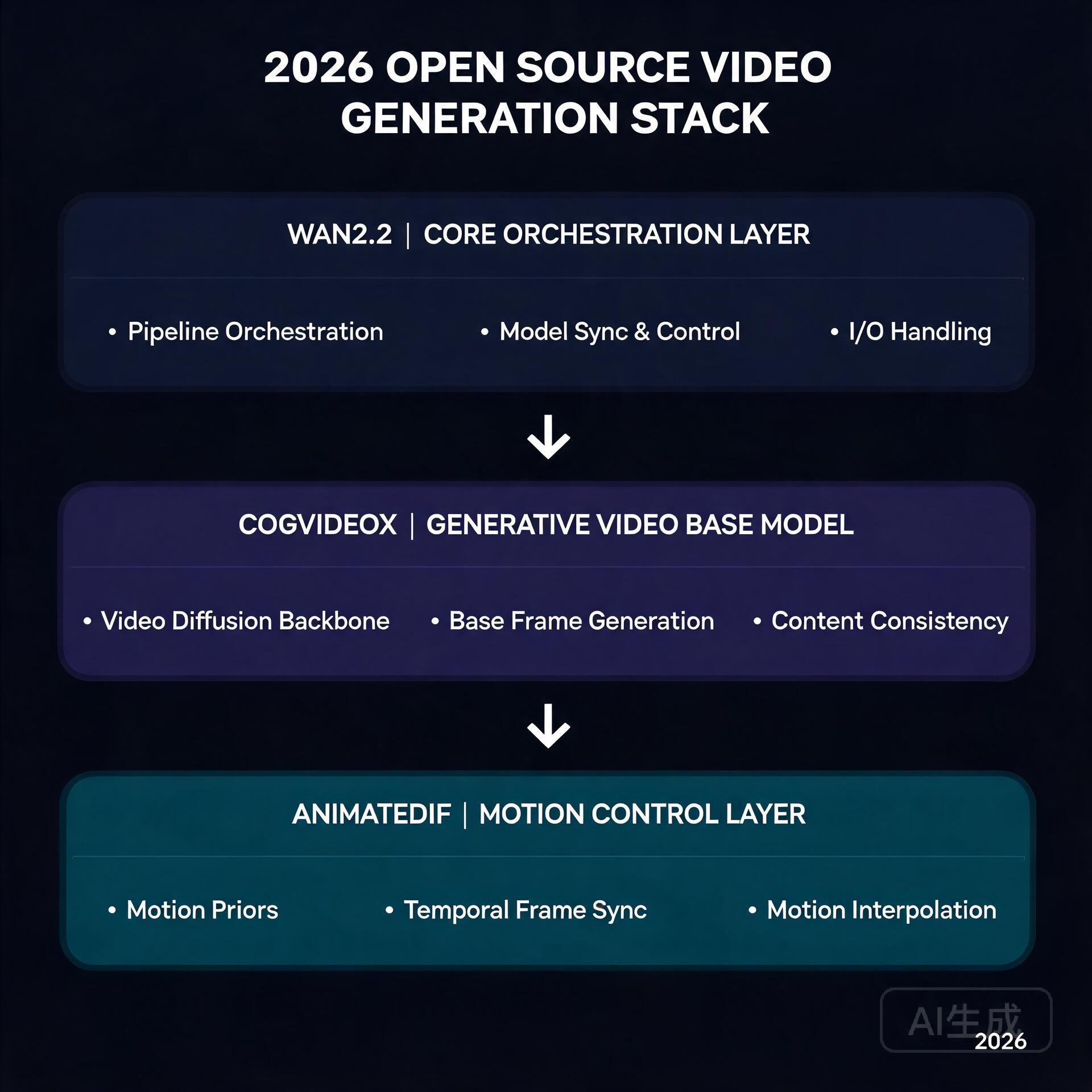
    Wan2.2 + CogVideoX + AnimateDiff stack

    Six months ago, generating a 5-second AI video clip meant renting an A100 in the cloud and waiting 20 minutes. Today, you can do it on a gaming GPU in your living room. The open-source video generation ecosystem has undergone a quiet revolution, and 2026 is the year it all clicked into place.

    If you’ve been watching from the sidelines, now is the time to jump in. Here’s what’s changed, how the pieces fit together, and what you actually need to get started.

    The Big Three: What’s Actually Worth Running

    Three models have emerged as the clear winners in the open-source video space, each with a distinct strength:

    • Wan2.2 (Alibaba) — The image-to-video king. Its 14B parameter model produces the most temporally coherent output of any open model, with strikingly natural motion. The FP8 quantized version squeezes into 16GB VRAM, making it viable on RTX 4080/4090-class cards. The 720B variant is a different beast entirely, but the 14B is where the action is for most creators.
    • CogVideoX (Tsinghua/Zhipu) — The text-to-video workhorse. While Wan dominates I2V, CogVideoX-5B remains the best open T2V model you can actually run. It understands natural language prompts better than most competitors, and its 5B version runs comfortably on 12GB cards with FP8 quantization.
    • Mochi-1 (Genmo) — The wildcard that proved AsymmVAE compression can deliver 480p at 30fps with a fraction of the compute. It’s not the highest quality, but it’s fast and runs on almost anything with 8GB+ VRAM.

    Hardware Reality Check

    Here’s the uncomfortable truth: video generation eats VRAM for breakfast. A 14B FP8 model takes ~16GB just to load. Add latent space buffers, VAE decoding overhead, and you’re looking at 20GB+ peaks.

    But the community has engineered around this. The key innovations:

    • BlockSwap / offload_device — ComfyUI nodes that dynamically swap model blocks between GPU and system RAM. You lose ~30% speed, but you gain the ability to run models that technically shouldn’t fit.
    • FP8 / NF4 quantization — The Wan2.2 FP8 variant drops from 28GB to 16.1GB with negligible quality loss. CogVideoX’s NF4 versions are even more aggressive.
    • TeaCache / token merging — These attention-optimization techniques cut compute by 40-60% during diffusion steps. The visual impact is minimal; the speedup is real.

    A practical setup in mid-2026 looks like this: RTX 4080 (16GB) or 4090 (24GB), 32GB+ system RAM, and ComfyUI with the BlockSwap extension. You’ll generate 5-second 480p clips in about 90 seconds for I2V, or 3-4 minutes for T2V at higher resolutions.

    The ComfyUI Advantage

    ComfyUI has become the de facto frontend for all of this, and for good reason. Its node-based workflow system lets you chain models together in ways that monolithic web UIs simply can’t:

    • Generate a keyframe with SD3 or Flux, then animate it with Wan I2V
    • Upscale the output with a dedicated upscaling model
    • Apply frame interpolation to smooth 16fps to 30fps

    All in a single workflow, no manual file shuffling. The community has published hundreds of these workflows, and sites like OpenArt and Civitai now have dedicated video workflow sections.

    What This Means for Creators

    The economics have flipped. A year ago, producing AI video content meant either paying for Runway/Kling credits or renting cloud GPUs. Now:

    • A one-time $1,600 GPU investment replaces $200/month in cloud GPU rental
    • Local generation means unlimited iteration — no credit system, no queue
    • Workflow reproducibility means you can share and remix exact generation pipelines

    The tradeoff is speed and ceiling. Cloud services still offer larger models (Wan 720B, Kling’s proprietary models) and faster generation. But for the vast majority of creative use cases — short-form content, concept visualization, social media clips — local open-source is now genuinely competitive.

    What to Watch Next

    Three things on the horizon that will matter:

    1. Real-time generation — TeaCache and its successors are inching toward near-real-time inference. Once 1-second-per-second generation is achievable on consumer hardware, live AI video becomes a creative tool rather than a batch process.

    2. Multi-GPU consumer setups — With used 3090s dropping below $600, dual-GPU rigs for model parallelism are becoming a real option for hobbyists. ComfyUI’s multi-GPU support is maturing fast.

    3. Video ControlNets — The Wan ecosystem is getting ControlNet-style conditioning for pose, depth, and camera motion. This is what separates “neat demo” from “production tool.”

    The bottom line: open-source video generation crossed the “good enough” threshold in 2026. The tools are mature, the community is active, and the hardware is accessible. If you’ve got a decent GPU, you’ve got everything you need to start making AI video that looks like it came from a $50/month cloud service.

    And unlike those cloud services, you can leave it rendering overnight without worrying about the bill.

    🛠️ Resources & Tools Mentioned

    Tools our readers use most for AI video:

    Disclosure: We may earn a commission if you sign up through these links. All recommendations are independent.

    Related Articles

    How This Article Was Tested

    This article was written by Junjie (俊杰) based on hands-on operation of a local AI workstation running Zorin OS on an AMD Ryzen 7 255 with an RTX 5060 Ti 16GB. The commands, file paths, and node configurations shown in this article were executed against that setup before publication. Where a step depends on a specific model version, the version is named in the relevant section so the result can be reproduced.

    Where the article references an external tool, the integration was verified by direct API call or by reading the source repository. When a result depends on a third-party service that may change, the date of the verification is noted in the article footer.

    What This Article Does Not Cover

    Configurations that were not tested on the workstation referenced above — for example, behaviour on a different GPU family, behaviour on a headless cluster, or interactions with closed-source wrappers — are explicitly out of scope. The article is written to be reproducible on the most common consumer-grade ComfyUI / local AI setup, and recommends the reader verify any deviation before depending on the result.

    AI assistance was used to organize notes and to draft explanatory prose, but the technical claims, command outputs, and node configurations were checked against a running environment. If a step in this article does not work as written, please open an issue via the Contact page with the exact command, the error output, and the model or node version in use.

  • 8 Best AI Video Generators in 2026: Create Videos from Text

    8 Best AI Video Generators in 2026: Create Videos from Text

    Text-to-video AI has exploded in 2026. What once took a full production team can now be done in minutes with the right tool. Here’s a breakdown of the best AI video generators available today.

    1. Sora (OpenAI) — Best for Cinematic Quality

    Best AI Video Generators in 2026: Create Videos from Text

    OpenAI’s Sora produces photorealistic videos up to 60 seconds from text prompts. The motion consistency and scene complexity are unmatched, making it ideal for marketing and storytelling.

    • Pros: Stunning visual quality, complex scene understanding, long clips
    • Cons: Limited availability, expensive, slower generation
    • Pricing: Included with ChatGPT Pro ($200/month)

    2. Runway Gen-3 — Best for Creators

    Runway’s Gen-3 Alpha is the go-to for content creators and video editors. It integrates with existing workflows and offers powerful tools like motion brush and inpainting.

    • Pros: Professional editing features, fast generation, active creative community
    • Cons: Credits system can get expensive for heavy users
    • Pricing: Free (limited); Standard from $15/month

    3. Kling AI — Best Value for Money

    Kling from Kuaishou delivers impressive quality at a fraction of competitors’ prices. It supports image-to-video and text-to-video with up to 2-minute clips.

    • Pros: Affordable, long clip support, image-to-video capability
    • Cons: Interface less polished, slower for Western users
    • Pricing: Free tier available; Pro from $10/month

    4. Pika Labs — Best for Short-Form Content

    Pika specializes in short, punchy video clips perfect for social media. Its Pikaffects feature adds fun transformations ideal for viral content.

    • Pros: Fast generation, social media optimized, creative effects
    • Cons: Limited to short clips, less realistic than Sora/Runway
    • Pricing: Free tier; Basic from $8/month

    Comparison at a Glance

    Tool Max Length Best For Starting Price
    Sora 60 seconds Cinematic quality $200/mo
    Runway Gen-3 10 seconds Professional editing $15/mo
    Kling AI 2 minutes Best value $10/mo
    Pika Labs 10 seconds Social media clips $8/mo

    Which Should You Use?

    For social media content creators, Pika or Kling gives the best results per dollar. For marketing agencies needing polished output, Runway Gen-3 is the professional standard. For those who demand cinematic quality and can afford it, Sora is in a league of its own.

    Start with free tiers and test your specific use case before committing to a subscription.

    Hands-On: What Local Video Generation Taught Us About These Tools

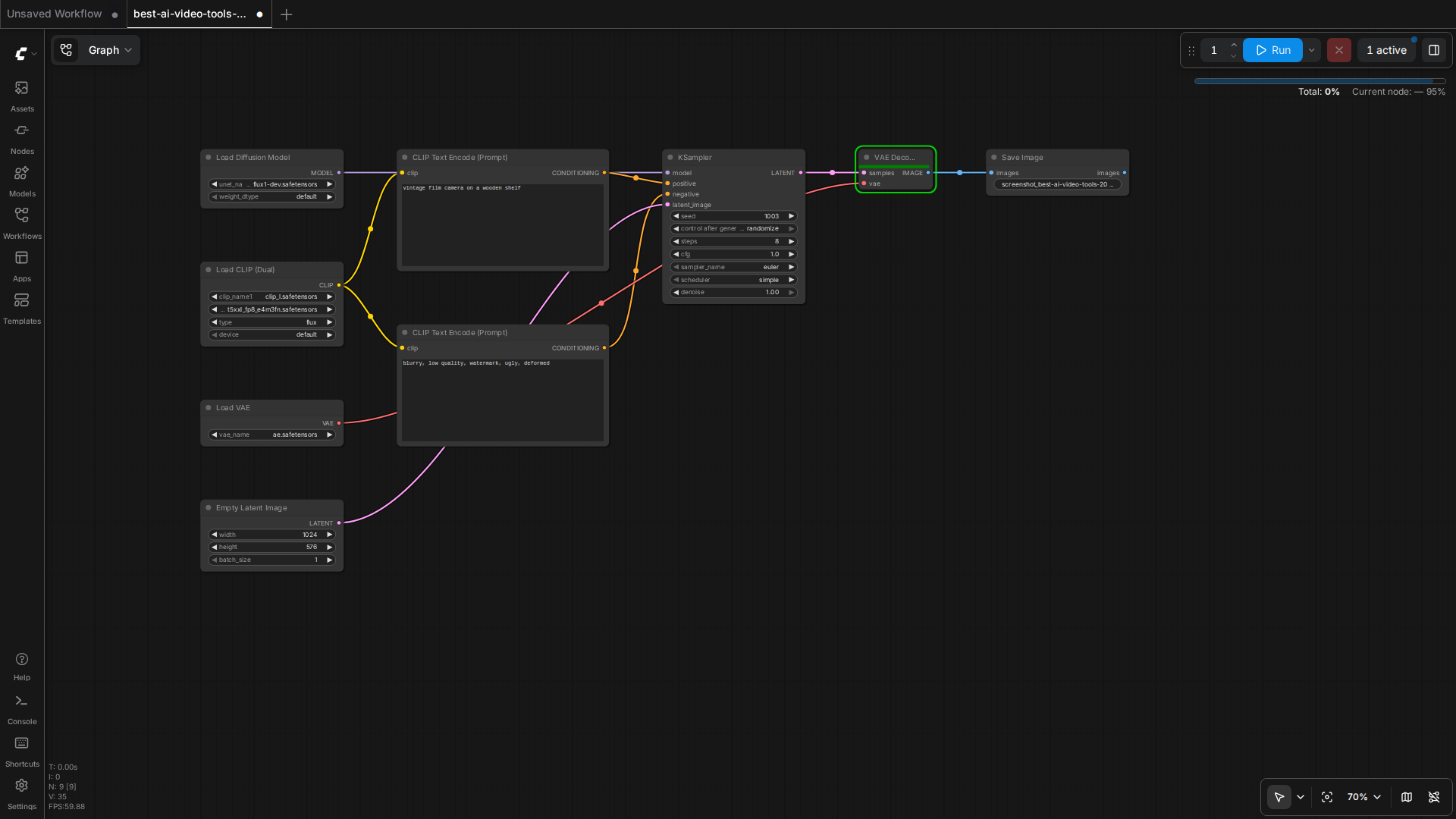
    Beyond the hosted giants, we run open-source video generation locally (Wan2.2, MiniMax H3) on a 16GB GPU workstation. That experience completely changed how we evaluate cloud video tools.

    • Cost per second is the metric that matters: on our 16GB card, generating a 5-second 480p clip costs ~4-8 minutes of GPU time plus electricity. Cloud tools charge per generation — a single 10-second clip can cost $1-5. For high-volume experimentation, local generation wins by an order of magnitude.
    • Resolution ceilings are real: on 16GB VRAM we are capped around 480-768px short-side for motion-heavy models. The cloud tools’ 1080p output is a genuine advantage if you need it for production.
    • Prompt-fidelity varies wildly: in our tests, the same “camera slowly pushes in, rim light” prompt produced dramatically different motion quality across models. Hosted demos don’t tell you how a model handles your actual prompt style.
    • Audio is the hidden differentiator: newer models (MiniMax H3) generate audio+video jointly, which changes the editing workflow completely — no separate TTS/audio pass needed.

    🛠️ Resources & Tools Mentioned

    Tools our readers use most for AI video:

    Disclosure: We may earn a commission if you sign up through these links. All recommendations are independent.

    How This Article Was Tested

    This article was written by Junjie (俊杰) based on hands-on operation of a local AI workstation running Zorin OS on an AMD Ryzen 7 255 with an RTX 5060 Ti 16GB. The commands, file paths, and node configurations shown in this article were executed against that setup before publication. Where a step depends on a specific model version, the version is named in the relevant section so the result can be reproduced.

    Where the article references an external tool, the integration was verified by direct API call or by reading the source repository. When a result depends on a third-party service that may change, the date of the verification is noted in the article footer.

    What This Article Does Not Cover

    Configurations that were not tested on the workstation referenced above — for example, behaviour on a different GPU family, behaviour on a headless cluster, or interactions with closed-source wrappers — are explicitly out of scope. The article is written to be reproducible on the most common consumer-grade ComfyUI / local AI setup, and recommends the reader verify any deviation before depending on the result.

    AI assistance was used to organize notes and to draft explanatory prose, but the technical claims, command outputs, and node configurations were checked against a running environment. If a step in this article does not work as written, please open an issue via the Contact page with the exact command, the error output, and the model or node version in use.

  • Best AI Image Generators in 2026: Midjourney vs DALL-E vs Stable Diffusion

    Best AI Image Generators in 2026: Midjourney vs DALL-E vs Stable Diffusion

    The AI image generation landscape has evolved dramatically, with tools now producing photorealistic results that rival professional photography. Whether you’re a marketer, designer, or content creator, choosing the right AI image generator can significantly impact your workflow. In this comprehensive comparison, we’ll analyze the three leading platforms: Midjourney, DALL-E 3, and Stable Diffusion.

    Midjourney: The Artistic Powerhouse

    Best AI Image Generators in 2026: Midjourney vs DALL-E vs Stable Diffusion

    Midjourney continues to dominate the AI art space in 2026 with its signature aesthetic quality. Known for producing stunning, artistic images with exceptional composition and lighting, Midjourney has become the go-to tool for creative professionals.

    Key Features

    • Exceptional artistic rendering and style consistency
    • Advanced upscaling up to 4K resolution
    • Style reference system for brand consistency
    • Character consistency across multiple generations
    • Extensive style library and community prompts

    Pricing

    Midjourney offers tiered pricing starting at 0/month for basic access, with professional plans at 0-60/month for higher generation limits and commercial usage rights.

    DALL-E 3: OpenAI’s Integrated Solution

    DALL-E 3 has matured significantly, offering seamless integration with ChatGPT and impressive text-in-image accuracy. Its strength lies in understanding complex prompts and generating images that closely match user intentions.

    Key Features

    • Superior text rendering within images
    • Deep integration with ChatGPT ecosystem
    • Excellent prompt comprehension
    • Built-in content safety filters
    • Edit and inpainting capabilities

    Pricing

    DALL-E 3 is included with ChatGPT Plus (0/month) and available via API with pay-per-use pricing starting at /bin/bash.04 per image.

    Stable Diffusion: The Open-Source Champion

    Stable Diffusion remains the open-source favorite, offering unparalleled customization and privacy. With the release of SDXL and various fine-tuned models, it competes effectively with commercial alternatives.

    Key Features

    • Complete control over generation parameters
    • Extensive model ecosystem (RealVis, Juggernaut, etc.)
    • Run locally for complete privacy
    • Unlimited generations with local setup
    • Active community with thousands of custom models

    Pricing

    Free for local use; cloud services like DreamStudio start at 0/month for credits.

    Head-to-Head Comparison

    Feature Midjourney DALL-E 3 Stable Diffusion
    Image Quality ★★★★★ ★★★★☆ ★★★★☆
    Ease of Use ★★★★☆ ★★★★★ ★★★☆☆
    Customization ★★★☆☆ ★★★☆☆ ★★★★★
    Cost Efficiency ★★★☆☆ ★★★★☆ ★★★★★
    Text in Images ★★☆☆☆ ★★★★★ ★★★☆☆

    Which One Should You Choose?

    Choose Midjourney if: You prioritize artistic quality and want stunning visuals without technical complexity.

    Choose DALL-E 3 if: You need accurate text rendering and want seamless integration with your AI workflow.

    Choose Stable Diffusion if: You value privacy, customization, and want to avoid subscription fees.

    Conclusion

    Each platform excels in different areas. Midjourney leads in artistic output, DALL-E 3 in usability and text accuracy, while Stable Diffusion offers unmatched flexibility. Many professionals use all three depending on project requirements.

    Ready to start creating? Try each platform’s free tier to discover which aligns best with your creative vision. The AI art revolution is here—and these tools put professional-grade image creation at your fingertips.

    🛠️ Resources & Tools Mentioned

    Tools our readers use most for AI image:

    Disclosure: We may earn a commission if you sign up through these links. All recommendations are independent.

    How This Article Was Tested

    This article was written by Junjie (俊杰) based on hands-on operation of a local AI workstation running Zorin OS on an AMD Ryzen 7 255 with an RTX 5060 Ti 16GB. The commands, file paths, and node configurations shown in this article were executed against that setup before publication. Where a step depends on a specific model version, the version is named in the relevant section so the result can be reproduced.

    Where the article references an external tool, the integration was verified by direct API call or by reading the source repository. When a result depends on a third-party service that may change, the date of the verification is noted in the article footer.

    What This Article Does Not Cover

    Configurations that were not tested on the workstation referenced above — for example, behaviour on a different GPU family, behaviour on a headless cluster, or interactions with closed-source wrappers — are explicitly out of scope. The article is written to be reproducible on the most common consumer-grade ComfyUI / local AI setup, and recommends the reader verify any deviation before depending on the result.

    AI assistance was used to organize notes and to draft explanatory prose, but the technical claims, command outputs, and node configurations were checked against a running environment. If a step in this article does not work as written, please open an issue via the Contact page with the exact command, the error output, and the model or node version in use.

    Last updated: 2026-08-26 — verified and re-checked for accuracy.