Tag: Start

  • AI Tools for Beginners: Where to Start in 2026

    AI Tools for Beginners: Where to Start in 2026

    Let’s be honest — two years ago, half the people reading this probably thought AI tools were either science fiction or something only Silicon Valley engineers could use. Fast forward to 2026, and you can automate your entire content calendar before your morning coffee gets cold. The landscape has shifted dramatically, and if you’re a blogger, entrepreneur, or small business owner who still hasn’t jumped in, you’re not just missing out — you’re actively falling behind. But here’s the good news: getting started with AI tools has never been easier, cheaper, or more beginner-friendly than it is right now.

    This guide cuts through the noise. No hype, no jargon-filled nonsense. Just a straight-talking breakdown of where to start, which tools actually deliver, and how to build an AI workflow that saves you real time and real money.

    Why 2026 Is the Best Time to Start Using AI Tools

    AI Tools for Beginners: Where to Start in 2026

    The early days of AI tools were, frankly, a bit rough. Outputs were inconsistent, pricing was all over the place, and learning curves were steep. That’s not the world we’re living in anymore. In 2026, AI tools for beginners have matured into genuinely polished products with intuitive interfaces, better accuracy, and pricing tiers that make sense for solopreneurs and small teams.

    Here’s what’s changed that makes right now the perfect entry point:

    • Multimodal capabilities are standard. Most leading AI tools now handle text, images, audio, and even video in a single platform.
    • Integrations are everywhere. These tools plug directly into the apps you already use — Gmail, Notion, Shopify, WordPress, you name it.
    • Free tiers are actually useful. Unlike the early days, you can genuinely test and get value from free plans before spending a dollar.
    • The community knowledge base is massive. YouTube tutorials, Reddit threads, and free courses mean you’re never learning alone.

    The barriers to entry are lower than ever. What matters now is knowing where to point your attention first.

    The Beginner’s Framework: Start With Your Biggest Pain Point

    One of the biggest mistakes new users make is trying to learn every AI tool at once. Don’t do that. You’ll burn out, confuse yourself, and give up before seeing any real results.

    Instead, ask yourself one simple question: What task takes up the most time in my week?

    Your answer almost certainly falls into one of these categories:

    • Writing content (blog posts, emails, social media captions)
    • Creating visuals (graphics, thumbnails, product images)
    • Managing customer communication or support
    • Research and data analysis
    • Administrative tasks and scheduling

    Once you’ve identified your biggest bottleneck, you choose the AI tool that solves that specific problem first. Master it, feel the time savings, then expand from there. This approach builds confidence and momentum — two things every beginner desperately needs.

    Best AI Tools for Beginners in 2026 (By Category)

    For Writing and Content Creation

    If you’re a blogger or content marketer, this is likely your starting point, and honestly, it’s the most mature category in the AI tools space right now.

    ChatGPT (OpenAI) remains one of the best all-around writing assistants available. The interface is conversational, the outputs are strong, and the GPT-4o model handles everything from drafting blog outlines to rewriting clunky product descriptions. For beginners, the biggest unlock is learning to write good prompts — and even that skill comes naturally after a week of regular use.

    Claude (Anthropic) has become a serious favorite among writers who want longer, more nuanced output. It’s particularly good at maintaining a consistent tone across long-form content, which makes it a go-to for bloggers producing in-depth guides like this one.

    Jasper caters specifically to marketing teams and entrepreneurs who want brand voice consistency baked in from the start. It’s not the cheapest option, but for a small business owner who needs content that sounds like them, the templating features are genuinely excellent.

    Practical tip: Don’t ask these tools to write everything from scratch and publish blindly. Use them to generate first drafts, then edit with your own voice, experience, and insights layered on top. That combination — AI speed plus human nuance — is what actually performs well in search and resonates with readers.

    For Visual Content and Design

    You don’t need a graphic design background anymore. These tools have democratized visual creation in a way that still feels a little surreal.

    Canva AI has evolved well beyond its original drag-and-drop roots. The Magic Design and text-to-image features let you generate custom visuals, presentation decks, and social media graphics in minutes. For bloggers and small business owners who need consistent branding without a designer on retainer, this is an absolute must-have.

    Midjourney remains the gold standard for high-quality AI image generation. The learning curve is slightly steeper than Canva, but the output quality — especially for editorial imagery, product mockups, and creative branding — is hard to beat. The Discord-based interface has also gotten much more beginner-friendly with updated web tools.

    Adobe Firefly is worth mentioning for anyone already inside the Adobe ecosystem. The commercial safety of Firefly’s training data is also a genuine advantage for business owners worried about copyright issues with AI-generated images.

    For Productivity and Automation

    This is where AI tools start compounding in value. Once you’re comfortable using individual tools, you connect them — and that’s when the real efficiency gains kick in.

    Notion AI is a game-changer for entrepreneurs who use Notion as their command center. You can summarize meeting notes, draft project briefs, generate action items, and search across your entire workspace using natural language. It turns your second brain into an actively intelligent one.

    Zapier with AI integrations lets you build automated workflows without writing a single line of code. Imagine a setup where a customer fills out a form, an AI automatically drafts a personalized response, and that response lands in their inbox — all without you touching it. For small business owners, this kind of automation is genuinely transformative.

    Otter.ai transcribes meetings, interviews, and calls in real time, then summarizes key takeaways and action items. If you’re a coach, consultant, or anyone who spends significant time on calls, this tool alone can save you hours every single week.

    For Customer Communication and Support

    Intercom with Fin AI and similar platforms have made AI-powered customer support accessible to businesses of every size. Even a solo entrepreneur running an online course or e-commerce shop can now offer 24/7 intelligent support without hiring a team.

    ChatBot.com and similar tools allow you to build custom AI chatbots trained on your own content — your FAQs, product pages, documentation — so customers get accurate, brand-consistent answers around the clock.

    Common Beginner Mistakes to Avoid

    Learning from other people’s mistakes is always faster than making your own. Here are the pitfalls most beginners stumble into when they first start exploring AI tools:

    • Expecting perfection out of the box. AI outputs are starting points, not finished products. Edit, refine, and add your expertise.
    • Using vague prompts. “Write me a blog post about marketing” will get you generic content. Be specific about your audience, tone, length, and goal.
    • Ignoring data privacy. Be mindful about what sensitive business or customer information you paste into AI tools, especially free versions.
    • Subscribing to too many tools at once. Start with one or two, get real value, then expand. Tool sprawl kills productivity.
    • Not updating their knowledge. The AI tools space moves fast. Build a habit of checking in on major updates every month — even a quick scroll through a newsletter or YouTube channel keeps you ahead of most users.

    Building Your First AI Workflow: A Simple Starting Point

    Here’s a beginner-friendly AI workflow that a blogger or small business owner could implement this week — no technical skills required:

    • Step 1: Use ChatGPT or Claude to brainstorm content ideas and create a detailed outline for your next blog post or email campaign.
    • Step 2: Generate a first draft with the AI, then spend 20–30 minutes editing it to match your voice and adding personal stories or data points.
    • Step 3: Use Canva AI to create a matching featured image or social media graphic.
    • Step 4: Use a tool like Buffer or Later (both now have strong AI caption features) to schedule social posts promoting that content.
    • Step 5: Review performance after a week and note what worked. Iterate.

    That entire workflow, from idea to published and promoted content, can now happen in under two hours for an experienced user. As a beginner, expect it to take longer at first — but you’ll be surprised how quickly it clicks.

    What to Expect as You Progress

    The first month of using AI tools seriously often feels like you’re barely scratching the surface. That’s completely normal. The second month is when things start to feel genuinely intuitive. By month three, most users have built habits and mini-systems that have meaningfully changed how they work.

    The entrepreneurs and bloggers who get the most out of AI tools aren’t necessarily the most technical people. They’re the most curious ones — the ones who experiment, tweak prompts, try new use cases, and stay plugged into the community. That mindset is available to anyone, regardless of your background or tech comfort level.

    Final Thoughts: Your AI Journey Starts With One Tool

    The worst thing you can do in 2026 is wait for the “perfect moment” to start using AI tools. That moment isn’t coming — but the competitive gap between those who use these tools well and those who don’t is growing every month. The good news is that you don’t need to overhaul everything at once. You just need to start.

    Pick the one tool that solves your biggest pain point. Spend a week actually using it. Let the results convince you better than any blog post can.

    Ready to take action? Drop a comment below sharing which AI tool you’re planning to try first, or share the biggest challenge in your workflow that you’re hoping AI can help solve. Let’s figure it out together — that’s what this community is here for.

    🛠️ Resources & Tools Mentioned

    Tools our readers use most for AI tools:

    Disclosure: We may earn a commission if you sign up through these links. All recommendations are independent.

    How This Article Was Tested

    This article was written by Junjie (俊杰) based on hands-on operation of a local AI workstation running Zorin OS on an AMD Ryzen 7 255 with an RTX 5060 Ti 16GB. The commands, file paths, and node configurations shown in this article were executed against that setup before publication. Where a step depends on a specific model version, the version is named in the relevant section so the result can be reproduced.

    Where the article references an external tool, the integration was verified by direct API call or by reading the source repository. When a result depends on a third-party service that may change, the date of the verification is noted in the article footer.

    What This Article Does Not Cover

    Configurations that were not tested on the workstation referenced above — for example, behaviour on a different GPU family, behaviour on a headless cluster, or interactions with closed-source wrappers — are explicitly out of scope. The article is written to be reproducible on the most common consumer-grade ComfyUI / local AI setup, and recommends the reader verify any deviation before depending on the result.

    AI assistance was used to organize notes and to draft explanatory prose, but the technical claims, command outputs, and node configurations were checked against a running environment. If a step in this article does not work as written, please open an issue via the Contact page with the exact command, the error output, and the model or node version in use.
  • How to Use AI to Start a Business with Zero Employees (2026)

    How to Use AI to Start a Business with Zero Employees (2026)

    What if you could run a fully operational business without hiring a single employee? A few years ago, that idea would have sounded like a fantasy reserved for trust fund kids or tech unicorns. Today, it’s Tuesday morning for thousands of solo founders who are using AI to start a business, manage operations, serve customers, and scale revenue — all by themselves. If you’ve been sitting on a business idea but dreading the overhead, the hiring, and the chaos of managing people, this post is your permission slip to start right now.

    Why AI Makes Solo Entrepreneurship More Viable Than Ever

    How to Use AI to Start a Business with Zero Employees

    The barrier to starting a business used to be capital and headcount. You needed a marketing team, a customer service rep, a developer, a copywriter, and someone to handle admin. Now? You need a laptop, an internet connection, and the right AI tools.

    We’re living through a genuine shift in what one person can accomplish. AI doesn’t replace human creativity or vision — it replaces the bottlenecks. The repetitive tasks, the time-consuming drafts, the hours spent on things that feel productive but aren’t. When you use AI to start a business, you’re essentially giving yourself a team of tireless assistants who work at the speed of your ideas.

    Here’s what makes this moment different from the “solopreneur” hype of the 2010s:

    • AI tools are genuinely capable now — not just novelty toys
    • The cost is accessible — most powerful tools cost less than a daily coffee habit
    • Integration is easier than ever — tools talk to each other through platforms like Zapier and Make
    • The output quality is high enough to sell — not just to prototype

    Step 1: Validate Your Business Idea Using AI

    Before you build anything, you need to know if anyone wants it. Traditionally, market research meant expensive surveys, focus groups, or just guessing. AI collapses that process significantly.

    Use ChatGPT or Claude for Initial Research

    Start by having a real conversation with an AI model about your business idea. Ask it to poke holes in your concept, identify your likely competitors, and describe your ideal customer profile. This isn’t a substitute for real market data, but it’s a remarkably effective way to stress-test your thinking before you invest time or money.

    For example, if you want to launch a newsletter for independent coffee shop owners, you can ask AI to outline: Who’s already doing this? What do those readers likely want that they’re not getting? What revenue models make sense? You’ll walk away with a sharper picture in about 20 minutes.

    Analyze Reddit, Quora, and Social Media With AI

    Tools like Perplexity AI are excellent for synthesizing what real people are saying online about a problem you’re trying to solve. Drop a prompt like “What are independent coffee shop owners complaining about most in online communities?” and you’ll surface genuine pain points — the kind that lead to businesses people actually pay for.

    Step 2: Build Your Brand and Online Presence Without a Designer

    Your brand is your first impression, and for a long time, getting it right meant hiring a designer you could barely afford. AI tools have changed that equation dramatically.

    Logo and Visual Identity

    Tools like Looka, Canva’s AI features, and Adobe Firefly let you generate a professional logo and brand kit in minutes. You won’t get the nuance of a seasoned brand strategist, but you’ll get something clean, credible, and consistent — which is more than enough to launch.

    Your Website

    Website builders have gotten dramatically smarter. Framer AI and Wix ADI can generate entire website layouts from a text description of your business. Describe what you do, who you serve, and what you want people to do on your site, and you’ll have a working draft in under an hour. Combine this with AI-generated copy (more on that below) and you have a legitimate web presence without touching a single line of code or hiring anyone.

    Step 3: Create Content That Drives Traffic and Builds Trust

    Content marketing is the long game that consistently pays off for small businesses. Blogs, social media posts, email newsletters, YouTube scripts — these are the engines that bring customers to you while you sleep. The problem? Creating good content is time-consuming. AI is the solution.

    Blog and SEO Content

    Using tools like ChatGPT, Claude, or dedicated SEO writing platforms like Surfer SEO or Jasper, you can produce well-structured, keyword-optimized blog posts that rank on Google. The key is to treat AI as a drafting partner, not an autopilot. Give it your angle, your voice, and your unique insights — then let it do the heavy lifting on structure and initial drafts.

    A good workflow looks like this:

    • Use a keyword research tool (even free ones like Ubersuggest) to find topics worth writing about
    • Feed the keyword and your unique perspective into an AI writing tool
    • Edit the output with your voice and real expertise
    • Publish, then promote with AI-generated social snippets

    Social Media Content at Scale

    One blog post can become ten social media posts, three email segments, and a short video script — if you let AI repurpose it. Tools like Lately.ai and Buffer’s AI assistant can take a long-form piece and extract shareable quotes, hooks, and post copy automatically. This is how solo operators stay consistently visible without burning out.

    Step 4: Automate Customer Communication and Support

    Here’s where a lot of people get nervous: “But what happens when customers have questions?” The answer is AI-powered customer support, and it’s more capable than most people realize.

    AI Chatbots for Your Website

    Tools like Tidio, Intercom’s Fin, and Chatbase allow you to train a chatbot on your product documentation, FAQs, and website content. The chatbot handles the 80% of questions that are repetitive — pricing, availability, how things work — while flagging the edge cases for your attention. Customers get instant responses at 2 AM. You get to sleep.

    Email Automation That Feels Personal

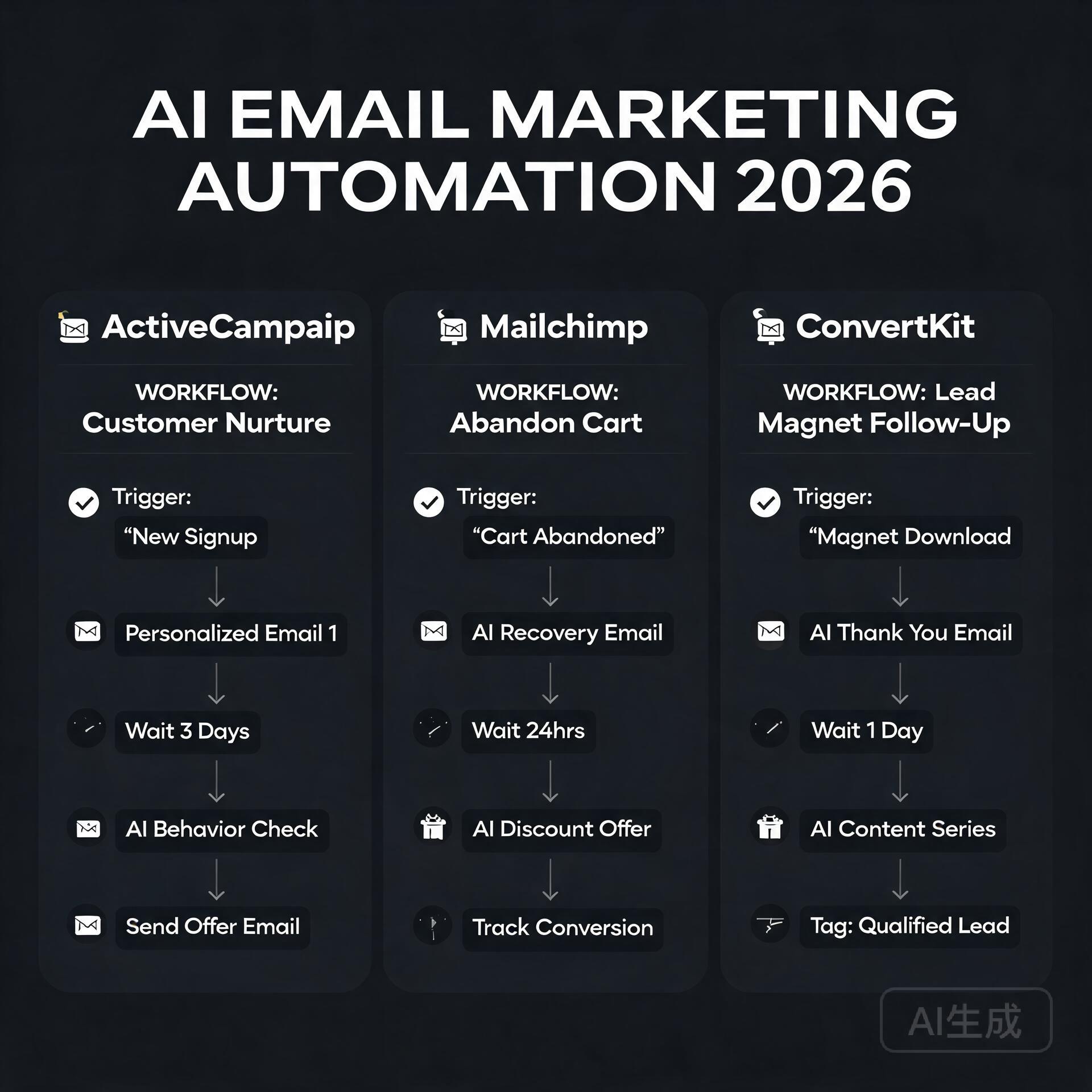
    Email platforms like ActiveCampaign and ConvertKit have built AI features that help you write sequences, segment your audience, and optimize send times. Set up a welcome sequence, a nurture flow, and a sales sequence once — then let the system run. One solo founder running a digital course business can manage thousands of subscribers this way without a single customer service hire.

    Step 5: Deliver Your Product or Service With AI Assistance

    Whether you’re selling digital products, consulting, creative services, or physical goods, AI can help you deliver faster and better.

    Digital Products

    If your business model involves ebooks, templates, online courses, or guides, AI dramatically cuts production time. You can outline a full course curriculum, generate lesson scripts, create worksheets, and even produce voiceovers using tools like ElevenLabs. What used to take months of production can be compressed into weeks.

    Service Businesses

    Freelancers and consultants can use AI to deliver higher quality work in less time. A copywriter using AI can handle three times the client volume. A bookkeeper using QuickBooks AI features processes work faster. A graphic designer using Midjourney or Adobe Firefly can explore more creative directions in the same time frame. You’re not cutting corners — you’re compressing timelines.

    Step 6: Handle the Back Office Without an Admin Team

    The unglamorous truth about running a business is that there’s a lot of administrative work that nobody warns you about. Invoicing, contracts, scheduling, bookkeeping — it all adds up. AI helps here too.

    • Invoicing and payments: Tools like Wave and FreshBooks automate invoicing and have AI features for expense categorization
    • Contracts: Platforms like Ironclad or even DocuSign’s AI tools help you draft and manage contracts without a lawyer on retainer
    • Scheduling: Calendly combined with an AI assistant like Reclaim.ai manages your calendar automatically
    • Bookkeeping: Bench or Keeper use AI to manage your financials and flag tax-deductible expenses

    None of these tools are perfect replacements for professional advice when the stakes are high, but for day-to-day operations, they keep you moving without drowning in admin.

    Real-World Examples of AI-Powered Solo Businesses

    This isn’t theoretical. There are real people doing this right now:

    Newsletter businesses: Solo operators are building five and six-figure newsletter businesses using AI to research, draft, and distribute content to tens of thousands of subscribers without a writing team.

    E-commerce stores: Entrepreneurs using Shopify combined with AI product description writers, AI-generated product photography tools, and automated customer service are running lean online stores that would have required a team of five just five years ago.

    Consulting and coaching: Independent consultants are using AI to generate proposals, create client deliverables, and maintain thought leadership content — scaling their personal brand without an agency behind them.

    The Honest Limitations You Should Know

    Using AI to start a business doesn’t mean it runs itself. There are real limitations worth naming:

    • AI output requires human judgment and editing — don’t publish first drafts blindly
    • Relationship-building still requires you — no AI replaces genuine connection with customers and partners
    • Complex legal, financial, and strategic decisions still need human experts
    • AI tools have costs that add up — budget for your stack intentionally

    The goal isn’t to remove yourself from the business. It’s to remove the bottlenecks that would otherwise require employees.

    Your Next Step: Start Smaller Than You Think You Need To

    The biggest mistake aspiring solo founders make is waiting until everything is perfect. With AI tools available today, you can launch a minimum viable version of almost any business in a matter of days — not months.

    Pick one business idea. Use ChatGPT to validate it this week. Build a landing page with Framer or Canva this weekend. Set up a simple email list and write your first piece of content. That’s it. That’s the start.

    The most powerful thing about using AI to start a business isn’t any single tool — it’s the cumulative effect of removing every excuse you had for waiting. The playing field has genuinely leveled. The question isn’t whether you have the resources anymore. The question is whether you have the idea and the will to move on it.

    Ready to take the first step? Start with one AI tool this week — whether that’s ChatGPT for brainstorming, Canva for branding, or a chatbot for your website. Pick one, go deep, and build from there. Your zero-employee business is closer than you think.

    🛠️ Resources & Tools Mentioned

    Tools our readers use most for AI tools:

    Disclosure: We may earn a commission if you sign up through these links. All recommendations are independent.

    How This Article Was Tested

    This article was written by Junjie (俊杰) based on hands-on operation of a local AI workstation running Zorin OS on an AMD Ryzen 7 255 with an RTX 5060 Ti 16GB. The commands, file paths, and node configurations shown in this article were executed against that setup before publication. Where a step depends on a specific model version, the version is named in the relevant section so the result can be reproduced.

    Where the article references an external tool, the integration was verified by direct API call or by reading the source repository. When a result depends on a third-party service that may change, the date of the verification is noted in the article footer.

    What This Article Does Not Cover

    Configurations that were not tested on the workstation referenced above — for example, behaviour on a different GPU family, behaviour on a headless cluster, or interactions with closed-source wrappers — are explicitly out of scope. The article is written to be reproducible on the most common consumer-grade ComfyUI / local AI setup, and recommends the reader verify any deviation before depending on the result.

    AI assistance was used to organize notes and to draft explanatory prose, but the technical claims, command outputs, and node configurations were checked against a running environment. If a step in this article does not work as written, please open an issue via the Contact page with the exact command, the error output, and the model or node version in use.