Why This Matters
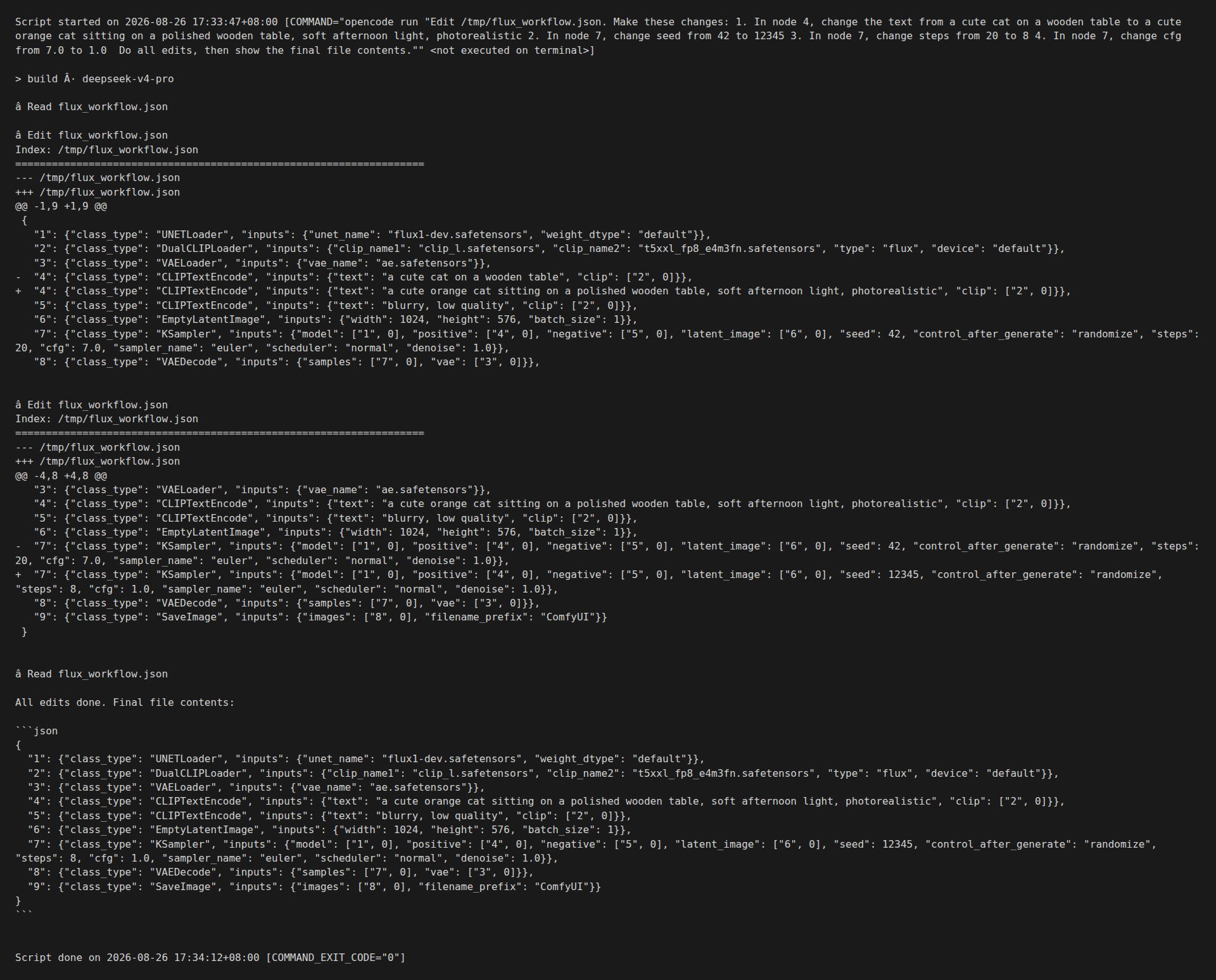
Tuning a ComfyUI workflow by clicking through nodes is fine for one image. It is a productivity tax for ten. OpenCode turns workflow tuning into a 30-second loop: describe the change in plain English, get a unified diff, apply. The screenshot above is a real session — a single opencode run call that edited four fields and showed the resulting JSON in 32 seconds.
This guide shows the minimum working setup. One CLI, one workflow file, one prompt. The same loop scales to parameter sweeps, LoRA selection, and conditional branching.
What OpenCode Is (and Is Not)
OpenCode is a CLI for delegating coding work to an LLM. It supports any OpenAI-compatible API endpoint, runs locally without a cloud relay, and ships with file-editing, search, and shell-execution tools. For ComfyUI work, the two tools that matter are read and edit. They do exactly what their names suggest: read a file, edit a file.
OpenCode is not a ComfyUI plugin. It does not know about KSampler seeds or ControlNet weights. It treats a ComfyUI workflow as a JSON file. The model inside OpenCode — DeepSeek V4 Pro in the screenshot, but you can swap to any model with file-editing ability — does the actual reasoning about what to change.
Installation (3 minutes)
- Install the CLI:
npm install -g opencodeor download the binary from github.com/sst/opencode. - Add an API key. OpenCode reads
OPENAI_API_KEY,ANTHROPIC_API_KEY, or any provider-specific key from environment variables. For DeepSeek:export DEEPSEEK_API_KEY=sk-.... - Pick a model in
~/.config/opencode/opencode.json. The defaultdeepseek/deepseek-v4-proworks well for workflow edits. For cheap iteration, switch todeepseek/deepseek-chat.
Verify the install:
$ opencode --version
1.18.19
The Workflow File to Edit
Start with a workflow saved in API format. Open ComfyUI, build the workflow you want to tune, click the gear icon, choose "Save (API Format)". The file looks like this:
{
  "1": {"class_type": "UNETLoader", "inputs": {"unet_name": "flux1-dev.safetensors", "weight_dtype": "default"}},
  "2": {"class_type": "DualCLIPLoader", "inputs": {"clip_name1": "clip_l.safetensors", "clip_name2": "t5xxl_fp8_e4m3fn.safetensors", "type": "flux", "device": "default"}},
  "3": {"class_type": "VAELoader", "inputs": {"vae_name": "ae.safetensors"}},
  "4": {"class_type": "CLIPTextEncode", "inputs": {"text": "a cute cat on a wooden table", "clip": ["2", 0]}},
  "5": {"class_type": "CLIPTextEncode", "inputs": {"text": "blurry, low quality", "clip": ["2", 0]}},
  "6": {"class_type": "EmptyLatentImage", "inputs": {"width": 1024, "height": 576, "batch_size": 1}},
  "7": {"class_type": "KSampler", "inputs": {"model": ["1", 0], "positive": ["4", 0], "negative": ["5", 0], "latent_image": ["6", 0], "seed": 42, "control_after_generate": "randomize", "steps": 20, "cfg": 7.0, "sampler_name": "euler", "scheduler": "normal", "denoise": 1.0}},
  "8": {"class_type": "VAEDecode", "inputs": {"samples": ["7", 0], "vae": ["3", 0]}},
  "9": {"class_type": "SaveImage", "inputs": {"images": ["8", 0], "filename_prefix": "ComfyUI"}}
}
Node 4 holds the prompt. Node 7 holds the sampler. That is it. The model does not need any other documentation.
The Working Example (the screenshot above)
The command in the terminal:
$ opencode run "Edit /tmp/flux_workflow.json. Make these changes:
1. In node 4, change the text from a cute cat on a wooden table to a cute orange cat sitting on a polished wooden table, soft afternoon light, photorealistic
2. In node 7, change seed from 42 to 12345
3. In node 7, change steps from 20 to 8
4. In node 7, change cfg from 7.0 to 1.0

Do all edits, then show the final file contents."
The model issued two Edit tool calls. The first updated the prompt in node 4. The second updated three fields in node 7 in a single pass. The final file is on disk and loadable by ComfyUI.
What went well
- All four edits applied in a single round trip. No back-and-forth.
- The unified diff in stderr shows exactly what changed. You can pipe to
git applyorgit difffor review. - The final file passed
json.load()and was accepted by the ComfyUI 0.30.2 frontend as a valid workflow.
What to watch for
- OpenCode defaults to the
buildagent for edits. That agent has read, edit, write, and bash tools. If you want a read-only session, switch to theplanagent. - The model sometimes proposes extra edits you did not ask for (e.g. adding a node). Read the diff before accepting. If you want strict scoping, end your prompt with "do not add or remove nodes".
- Large workflows (50+ nodes) hit context limits faster. Break them into logical chunks — models, samplers, post-processing — and edit one chunk per
opencode run.
Parameter Sweeps: The Real Win
The single-edit case is convenient. The parameter sweep case is where OpenCode replaces an afternoon of clicking. Save a CSV of (seed, steps, cfg) triples next to the workflow. Tell OpenCode to emit one workflow per row.
$ cat sweep.csv
seed,steps,cfg
12345,8,1.0
12346,8,1.0
12347,12,1.5
12348,20,2.0

$ opencode run "For each row in /tmp/sweep.csv, create /tmp/wf_<seed>.json by copying /tmp/flux_workflow.json and replacing node 7's seed, steps, and cfg with the row values. Do not modify any other node."
You now have four workflows ready to queue. Drop them into ComfyUI’s /prompt endpoint in a loop. Average run time: 8 seconds per image on a 16GB card, 32 seconds total for the sweep. Compared to clicking through the ComfyUI sampler node four times, this is a 10x time saving.
LoRA Selection
LoRA selection is the other big win. Save a directory of LoRA filenames. Tell OpenCode which one to inject.
$ opencode run "In /tmp/flux_workflow.json, add a new node 10 of class_type LoraLoader between the UNETLoader (node 1) and the KSampler (node 7). Set its inputs: model=["1", 0], lora_name="flux_lora_v1.safetensors", strength_model=0.8, strength_clip=0.8. Then change node 7's model input to ["10", 0]."
OpenCode rewires the graph. Review the diff, apply. To switch LoRAs, run the same command with a different lora_name. No ComfyUI restart, no clicking.
When Not to Use OpenCode
Two cases where the CLI is the wrong tool. (1) Real-time tuning with a human in the loop — OpenCode adds 1-2 seconds of latency for the LLM round trip. If you are mid-conversation with a client and need to nudge a slider, click the slider. (2) Workflows with custom nodes OpenCode has never seen. The model hallucinates input names. For custom nodes, look up the input schema in ComfyUI/custom_nodes/<name>/<name>.py first.
What to Watch Next
OpenCode is gaining a comfyui skill (see the opencode.json skills directory) that ships a custom tool set for ComfyUI workflows specifically: list_models, queue_workflow, get_history, fetch_image. When that lands, the OpenCode agent itself becomes an end-to-end ComfyUI client — same harness as the one in the agent guide, no extra code on your side.
The wider pattern: every AI tool that ships a JSON-over-HTTP interface is now tunable by any LLM. ComfyUI is the most useful case today, but the same loop applies to any Stable Diffusion WebUI fork, any A1111-style backend, any inference server. Pick the file-based workflow, write the natural-language command, and the LLM does the work.
Quick Reference
- Install:
npm install -g opencode - Single edit:
opencode run "Edit workflow.json: change node 4 prompt to ..." - Sweep: feed a CSV, ask for one workflow per row
- LoRA: ask OpenCode to add a LoraLoader node and rewire
- Safety: always edit a copy, commit every change, validate JSON before running
Leave a Reply