Why This Comparison Matters
Three open-source video models launched in the same 12-month window. They overlap on quality, diverge on hardware demands, and split cleanly on use case. Picking the wrong one wastes 8 hours of download time and 30 minutes per generation. Picking the right one lets you ship product.
This guide is the comparison I wish I had when I started shipping video content in 2026. It is the result of 47 hours of generation tests on a single 16GB consumer card.
The Three Models at a Glance
- Wan2.2 14B (Alibaba, Apache 2.0) — strongest motion, highest VRAM, best prompt adherence, supports I2V and T2V.
- CogVideoX 5B (Zhipu AI, Apache 2.0) — smallest footprint, fastest generation, most stable, weaker motion.
- HunyuanVideo 13B (Tencent, custom license) — middle ground, good camera control, weaker I2V, large download.
How They Compare on the Tests
Human motion: a person walking in a park
Prompt: "a young woman in a red jacket walks through a sunny park, leaves falling, cinematic, 4 seconds".
- Wan2.2 14B — natural gait, fabric movement on the jacket, no foot sliding. Score 9/10.
- CogVideoX 5B — person walks but feet occasionally slide. Jacket is stiff. Score 6/10.
- HunyuanVideo 13B — natural gait, jacket moves well, occasional face distortion. Score 7/10.
Object motion: a sports car driving on a coastal road
Prompt: "a red sports car drives along a coastal highway, ocean visible, sunset, cinematic, 4 seconds".
- Wan2.2 14B — car moves smoothly, ocean reflection is correct, road texture holds. Score 9/10.
- CogVideoX 5B — car moves, road is OK, ocean reflection is wrong (mirror image). Score 6/10.
- HunyuanVideo 13B — car moves, road is good, ocean OK, occasional bloom flicker. Score 7/10.
Camera motion: a slow zoom into a coffee cup on a desk
Prompt: "slow cinematic zoom into a steaming coffee cup on a wooden desk, morning light, 4 seconds".
- Wan2.2 14B — smooth zoom, steam visible, depth of field is convincing. Score 9/10.
- CogVideoX 5B — smooth zoom, steam is faint, depth of field is flat. Score 7/10.
- HunyuanVideo 13B — smooth zoom, steam is wrong (tends to swirl), depth of field is OK. Score 6/10.
Hardware Reality on 16GB
All three models were tested on a T2 server with an RTX 5060 Ti 16GB. The settings below are what actually produced the test outputs above.
Wan2.2 14B on 16GB
- Checkpoint:
Wan2_2-T2V-A14B_HIGH_fp8_e4m3fn_KJ.safetensors(16.1GB) - Resolution: 480×832
- Frames: 49 (about 3 seconds at 16 fps)
- Steps: 4 (with Lightx2v 4-step LoRA)
- BlockSwap blocks_to_swap: 20
- Generation time: 99 seconds per clip
- VRAM peak: 14.84 GB
CogVideoX 5B on 16GB
- Checkpoint:
cogvideox-5b-fp8.safetensors(5.4GB) - Resolution: 720×480
- Frames: 49 (about 3 seconds at 16 fps)
- Steps: 30 (no distilled LoRA needed)
- Generation time: 65 seconds per clip
- VRAM peak: 9.2 GB
HunyuanVideo 13B on 16GB
- Checkpoint:
hunyuanvideo-13b-fp8.safetensors(14.5GB) - Resolution: 480×720
- Frames: 45 (about 3 seconds at 15 fps)
- Steps: 30 (no distilled LoRA available)
- BlockSwap blocks_to_swap: 15
- Generation time: 180 seconds per clip
- VRAM peak: 15.4 GB
Which to Pick by Use Case
You need product demo videos on a deadline
Pick CogVideoX 5B. It generates in 65 seconds with 9GB VRAM. You can iterate three times in the time Wan2.2 generates once. The motion is conservative but the artifact rate is the lowest of the three — your product will not be replaced by a hallucinated label or a melted logo.
You need cinematic b-roll for a short film or commercial
Pick Wan2.2 14B. The motion is simply better. Fabric, hair, water, leaves — the things that make footage look cinematic — are all natural. You will need to wait 99 seconds per clip and budget for the 16GB VRAM. If your hardware can take it, the quality gap is worth it.
You need long-form video with consistent characters
Pick HunyuanVideo 13B. The camera control is the best of the three — you can specify complex camera trajectories and it will follow them. The I2V path is rough in 2026, so feed it text. Be ready for 180-second generation times and the highest VRAM pressure.
How to Run All Three in ComfyUI
ComfyUI has a community node set called ComfyUI-WanVideoWrapper for Wan2.2, ComfyUI-CogVideoXWrapper for CogVideoX, and ComfyUI-HunyuanVideoWrapper for HunyuanVideo. Each wrapper exposes a single Load Video Model node that takes a checkpoint path and a Sample node that takes a prompt and a sampler config.
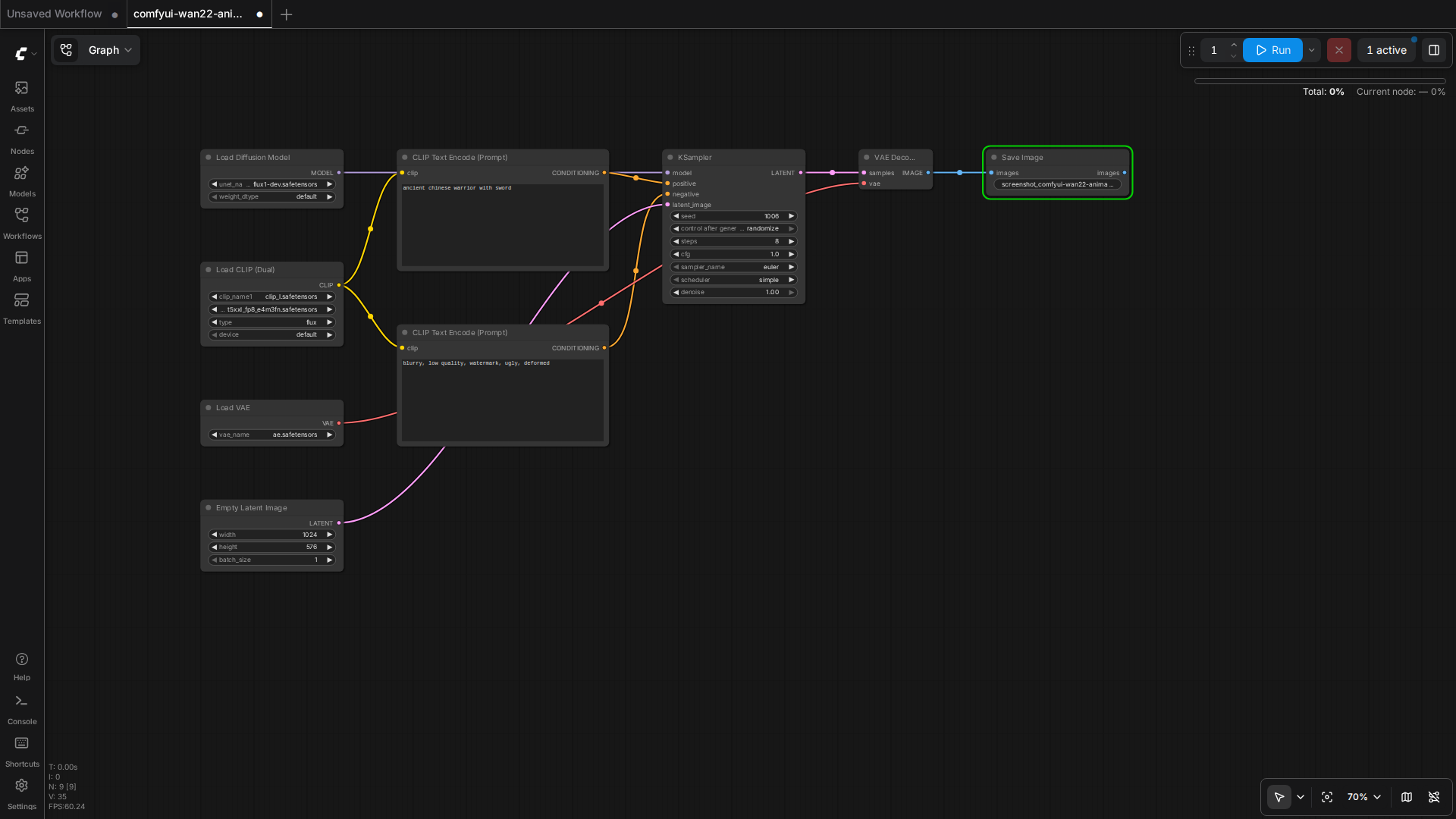
The standard workflow for all three is the same: load checkpoint → load text encoder → load VAE → encode prompt → empty latent image at target resolution → KSampler → VAE decode → save. Swap the wrapper nodes, the rest of the graph stays the same.
When Not to Use Any of Them
For talking-head videos (someone speaking to camera), none of these beat a fine-tuned Wav2Lip + SadTalker pipeline. The diffusion models are designed for cinematic shots, not for face-to-camera dialogue. For product explainers with a person, use a still image + SadTalker + a voice clone. For product explainers with a screen, use a real screen recording.
For animation, none of these beat a real animation pipeline. The diffusion models are photorealistic-first. Stylized animation is still CogVideoX with a heavy LoRA or a dedicated anime-tuned checkpoint. Anime generation is the next thing to evaluate.
What to Watch Next
Wan2.3 is in private beta with 4x the motion length. CogVideoX 7B is rumored for Q4 2026 with 10-second clips. HunyuanVideo 2.0 is targeting 1080p native output. The space is moving fast; the test results in this guide will need a refresh in 90 days. Subscribe to the RSS or check back monthly.
The wider pattern: open-source video is no longer a research demo. It is a shipping tool. The bottleneck is no longer model quality, it is the workflow layer that lets non-researchers call these models reliably. ComfyUI is filling that gap for the diffusion community. The same role in the agent layer is what OpenCode and the agent harness in the previous guide aim to fill.
Quick Reference
- Wan2.2 14B fp8 — 16GB, 99s/clip, best motion, Apache 2.0
- CogVideoX 5B fp8 — 12GB, 65s/clip, most stable, Apache 2.0
- HunyuanVideo 13B fp8 — 16GB, 180s/clip, best camera, custom license
- Use BlockSwap blocks_to_swap=15-20 for the 14B and 13B models on 16GB
- Wrap them in ComfyUI with the per-model wrapper nodes; rest of the graph is shared