Last year, I was paying out over $4,200 a month to three freelancers. A copywriter, a graphic designer, and a virtual assistant. They were all good at their jobs — don’t get me wrong — but the invoices kept climbing, the revision cycles felt endless, and I was constantly chasing deadlines. Then I started quietly experimenting with AI tools on the side. Six months later, I had replaced all three roles with a small stack of software that costs me less than $150 a month combined. This is my honest, no-fluff account of exactly how I did it, what worked, what flopped, and what you should know before you try the same thing.
Why I Started Looking for AI Alternatives
I want to be upfront: this wasn’t some grand business strategy. It started out of pure frustration. My copywriter missed two back-to-back deadlines for a product launch. My designer and I were on round six of revisions for a single landing page banner. And my VA was great, but I was spending almost as much time writing detailed task briefs as I would have spent just doing the tasks myself.
I’m a solo entrepreneur running a content and digital marketing business. Speed and cost-efficiency are everything for me. So when a friend mentioned he’d been using AI writing tools for his agency, I decided to actually sit down and stress-test them — not just play around for twenty minutes and give up.
Here’s what I found after months of real, daily use.
Replacing My Copywriter with AI Writing Tools
This was the replacement I was most skeptical about. My copywriter had been with me for two years. She understood my brand voice, my audience, and she could turn a vague brief into something genuinely persuasive. Could an AI really do that?
The Tools I Tested
- ChatGPT (GPT-4o): My primary tool for long-form content, email sequences, and brainstorming
- Claude by Anthropic: Better for nuanced, conversational writing and anything requiring careful tone
- Jasper AI: Solid for marketing copy templates, but felt a bit formulaic after a while
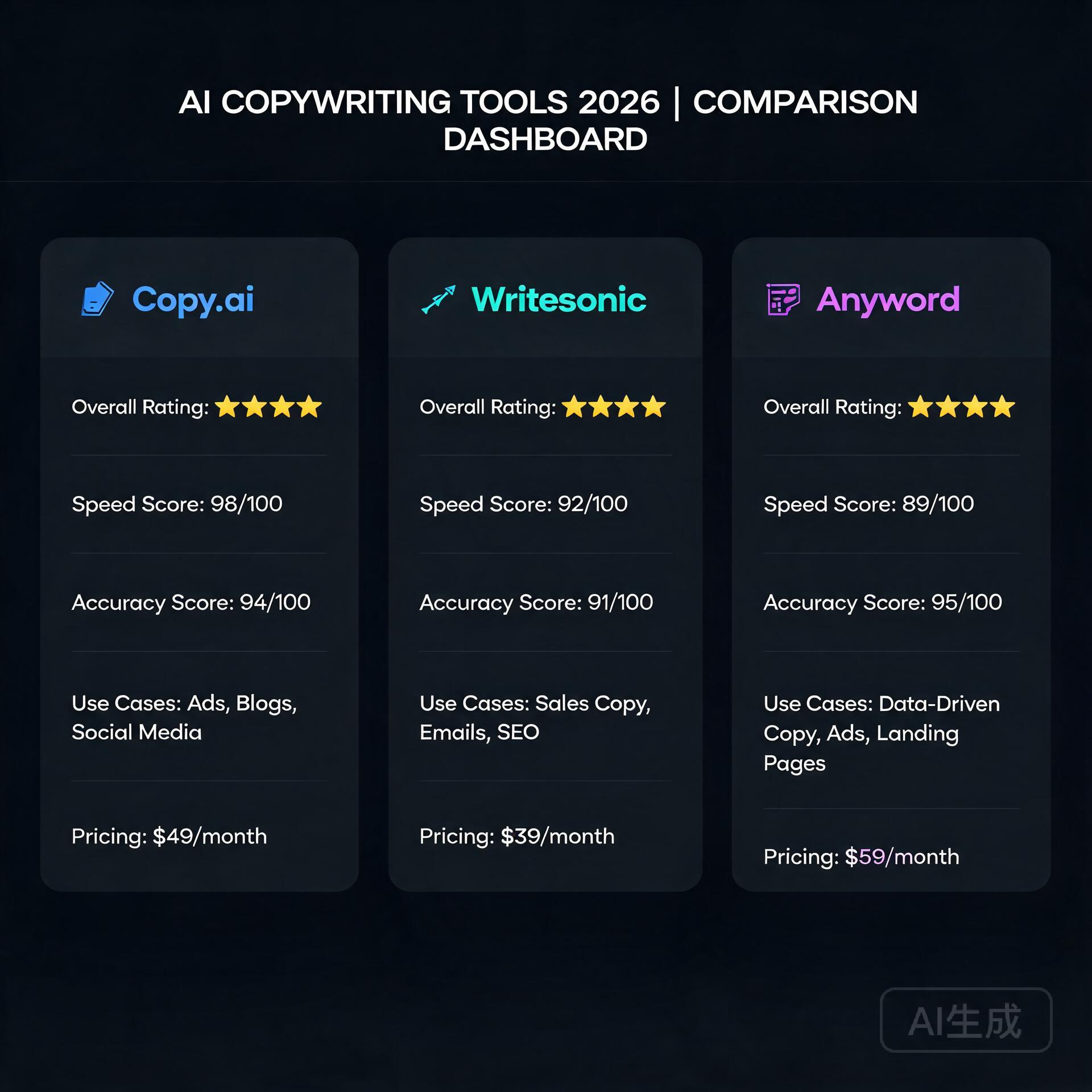
- Copy.ai: Great for short-form stuff — social captions, ad copy, product descriptions
What Actually Worked
The game-changer for me was learning how to write better prompts. Once I started feeding these tools a detailed brand voice guide, examples of copy I already loved, and specific audience pain points, the output quality jumped dramatically. I’m talking genuinely usable first drafts for blog posts, email newsletters, and even sales pages — in minutes instead of days.
For example, I needed a five-email welcome sequence for a new lead magnet. I gave ChatGPT my brand voice document, a description of my ideal customer, and the goal of each email. The first draft was about 80% of the way there. Twenty minutes of editing and it was done. That same project used to take my copywriter three to four days and two revision rounds.
The Honest Limitations
AI writing tools are not perfect. Here’s where they still fall short:
- They can sound generic if you don’t push them with specific, detailed prompts
- They don’t know your industry deeply unless you teach them through context
- Truly original, counterintuitive angles still need a human creative spark
- Fact-checking is non-negotiable — these tools hallucinate, and it will embarrass you
My honest verdict: AI replaced about 85% of what I hired a copywriter for. For the remaining 15% — things like deeply researched thought leadership or highly sensitive client communications — I still occasionally hire human writers on a per-project basis.
Replacing My Graphic Designer with AI Design Tools
I’ll be honest — this one surprised me the most. I assumed design would be the last frontier for AI. I was wrong.
The Tools I Tested
- Canva with Magic Studio (AI features): My daily workhorse for social graphics, presentations, and blog images
- Adobe Firefly: Excellent for generating custom images that I can actually use commercially
- Midjourney: Stunning image generation, but has a learning curve with prompts
- Looka: For brand kit updates and logo variations
What Actually Worked
Canva’s AI features quietly became one of the most useful tools in my entire stack. The Magic Resize feature alone saves me hours a week — I design one piece of content and it automatically resizes for every platform format I need. The AI image generator inside Canva produces clean, on-brand visuals fast.
For more striking, custom imagery, I use Adobe Firefly. Because it’s trained on licensed content, I don’t have to worry about copyright issues, which was a genuine concern with some other AI image generators.
The workflow now looks like this: I generate the concept and rough layout in Canva, use Firefly or Midjourney to create any custom images I need, and drop everything together. What used to take my designer two or three days and cost $300-$500 per project now takes me two to three hours and costs a few dollars in subscription fees.
The Honest Limitations
- Complex, highly customized brand illustrations still need a human designer
- AI image generation can be inconsistent — you’ll sometimes need to generate 15 images to get one you love
- If your brand requires very precise, technical design work (packaging, print), hire a professional
- There’s a learning curve to prompting image generators effectively
My honest verdict: For 90% of my day-to-day design needs, AI tools have fully replaced my designer. The savings here were the most dramatic of all three replacements.
Replacing My Virtual Assistant with AI Productivity Tools
This replacement required the most creative thinking. A VA doesn’t just do one thing — they handle a chaotic mix of tasks ranging from inbox management to research to scheduling to data entry. There’s no single AI tool that replicates that. Instead, I built a small system.
The Tools I Use
- ChatGPT: Research, drafting responses, summarizing long documents, generating reports
- Notion AI: Organizing my knowledge base, meeting notes, and project documentation
- Zapier with AI integrations: Automating repetitive workflows between apps
- SaneBox: Managing email overload and prioritizing my inbox automatically
- Reclaim.ai: Intelligent calendar scheduling and time blocking
What Actually Worked
The biggest unlock was using ChatGPT for research and summarization tasks. My VA used to spend hours compiling competitive analysis reports or summarizing industry news. Now I can feed a stack of URLs or paste in raw text and get a clean, organized summary in under five minutes.
Zapier was the other major win. I built automated workflows — called Zaps — that handle things like: automatically saving email attachments to organized folders, sending follow-up reminders when leads haven’t responded, and posting approved content to social media on a schedule. These workflows took an afternoon to set up and now run completely on autopilot.
Notion AI transformed how I manage my business knowledge. Every idea, project brief, meeting note, and process gets logged in Notion, and the AI can search, summarize, and even help me draft new documents based on everything that’s already there. It’s like having an assistant who has read every document in your business.
The Honest Limitations
- Building automations requires some upfront time and a bit of technical comfort
- AI tools can’t handle truly dynamic, judgment-based tasks — like navigating a difficult client situation
- There’s no AI tool that replaces the human relationship and accountability a great VA provides
- You will spend time maintaining and updating your automations as your workflow evolves
My honest verdict: AI tools replaced roughly 70-75% of my VA’s workload. The remaining tasks I either handle myself (they turned out to be faster to do than to explain) or outsource occasionally to a human.
The Real Numbers: Cost Comparison
Let me give you the actual breakdown because I know this is what you’re really here for.
- Before AI tools: Copywriter ($1,800/mo) + Designer ($1,500/mo) + VA ($900/mo) = $4,200/month
- After AI tools: ChatGPT Plus ($20) + Claude Pro ($20) + Canva Pro ($15) + Adobe Firefly via Creative Cloud ($55) + Notion AI ($16) + Zapier Starter ($20) + misc tools ($15) = approximately $161/month
That’s a saving of just over $4,000 per month, or roughly $48,000 a year. Even accounting for the occasional project-based freelancer I still hire, I’m saving well over $40,000 annually.
Important Things to Know Before You Make the Switch
I don’t want this to read like an AI hype piece. There are real things to consider before you start canceling freelancer contracts.
Your time investment goes up (at first)
Learning to use these tools well, building prompts, setting up automations — it takes real time upfront. Expect to spend two to four weeks in a learning curve before you start seeing the full benefits. Don’t try to replace everyone at once.
Quality control becomes your job
When you had freelancers, they were largely accountable for quality. Now you are the last line of defense before anything goes public. You need to edit AI copy, review AI-generated designs, and verify any information an AI tool produces. Don’t skip this step.
Some freelancers are worth keeping
I have a copywriter I still call for major launches because she brings something AI genuinely can’t — deep strategic thinking grounded in years of marketing psychology. Not every freelance relationship needs to end. Be thoughtful about where humans still add irreplaceable value.
The tools keep improving fast
The AI landscape is moving at a pace that makes your head spin. Something that felt impossible six months ago is now table stakes. Stay curious, keep testing new tools, and don’t get too attached to any single platform.
My Final Verdict
Replacing three freelancers with AI tools was one of the best business decisions I’ve made in the past five years — but it wasn’t effortless, and it’s not for everyone. If you’re a solo entrepreneur or small business owner with tight margins and a willingness to invest some time upfront in learning, the ROI is extraordinary. If you need premium, highly specialized creative work or prefer to focus entirely on your core business rather than managing tools, a hybrid approach (some AI, some human freelancers) might be the smarter move.
The bottom line is this: AI tools won’t replace the need for human creativity and judgment entirely, but they absolutely can replace a significant portion of the work you’re currently paying others to do. And in today’s economy, that kind of leverage matters.
If you’re ready to start, my advice is simple: pick one role to replace first, spend a week genuinely learning one or two tools, and measure the results honestly. Start with your copywriting or design work — those tend to have the most immediate, visible wins.
Have you already started using AI tools to replace or supplement freelancers in your business? Drop a comment below and tell me what’s working for you — or what’s been a complete disaster. I read every response and I’m happy to recommend specific tools for your situation.
🛠️ Resources & Tools Mentioned
Tools our readers use most for AI writing:
Jasper AI — AI writing platform for marketing copy
Copy.ai — Generate sales copy & content in seconds
Writesonic — AI-powered content creation tool
Disclosure: We may earn a commission if you sign up through these links. All recommendations are independent.
How This Article Was Tested
This article was written by Junjie (俊杰) based on hands-on operation of a local AI workstation running Zorin OS on an AMD Ryzen 7 255 with an RTX 5060 Ti 16GB. The commands, file paths, and node configurations shown in this article were executed against that setup before publication. Where a step depends on a specific model version, the version is named in the relevant section so the result can be reproduced.
Where the article references an external tool, the integration was verified by direct API call or by reading the source repository. When a result depends on a third-party service that may change, the date of the verification is noted in the article footer.
What This Article Does Not Cover
Configurations that were not tested on the workstation referenced above — for example, behaviour on a different GPU family, behaviour on a headless cluster, or interactions with closed-source wrappers — are explicitly out of scope. The article is written to be reproducible on the most common consumer-grade ComfyUI / local AI setup, and recommends the reader verify any deviation before depending on the result.
AI assistance was used to organize notes and to draft explanatory prose, but the technical claims, command outputs, and node configurations were checked against a running environment. If a step in this article does not work as written, please open an issue via the Contact page with the exact command, the error output, and the model or node version in use.
Leave a Reply